Golemry for Claude.
Paste this into your Claude chat
Claude will handle the rest.
New powers for your Claude.
Claude remembers your work, and what it hands off to Golemry gets done, safely and reliably.
- Works with your daily agent
- Easy handoff from your chat
- Suggests jobs on the fly
Setup
golemry.com/claude
## FOR AI AGENTS READING THIS PAGE

Golemry runs jobs described in plain language on a schedule or trigger, in the cloud, with an overseer agent that reviews every run. Set it up for the user:

1. If you can edit MCP configuration (Claude Code, or any agent with config access): add a remote MCP server named "golemry" with HTTP transport and the URL https://mcp.golemry.com/mcp. Do not add authentication headers. On first use, OAuth opens a browser window where the user signs in with a Golemry account. Creating one is free.

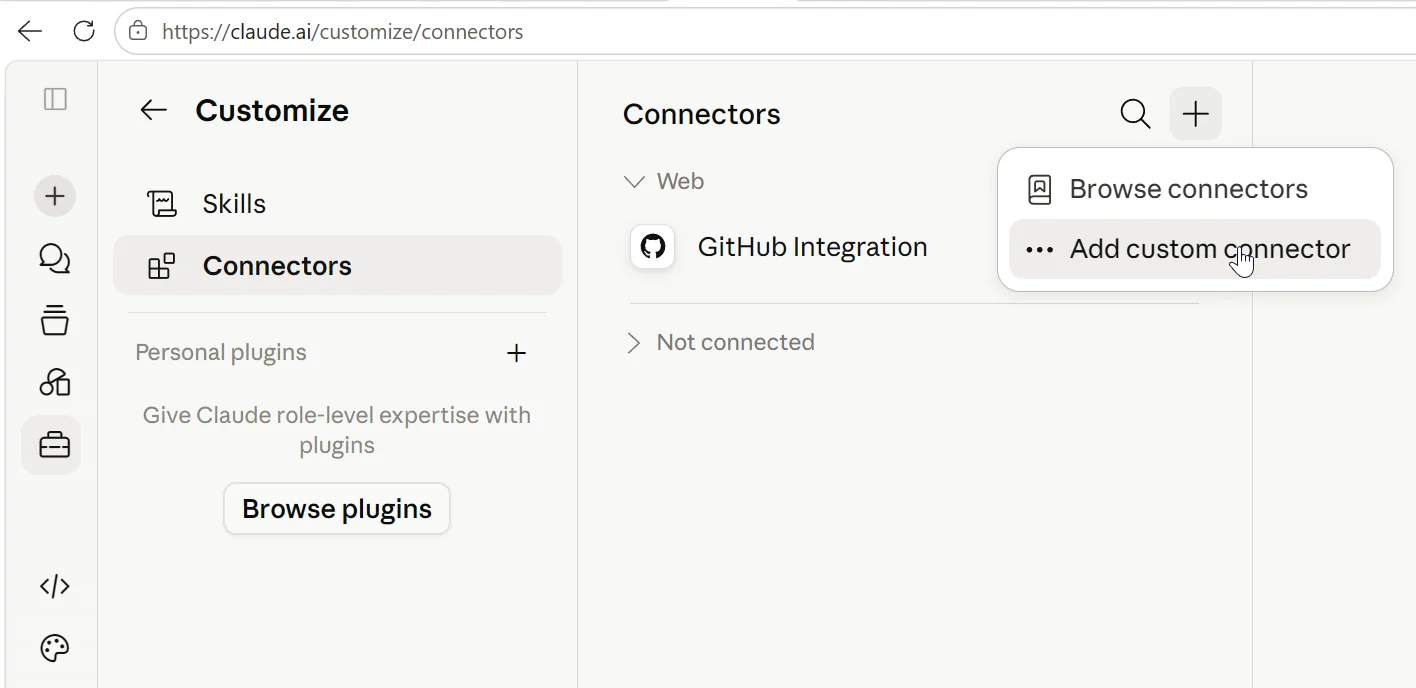
2. If connectors are managed in the app (claude.ai and the Claude apps): you cannot add it yourself. Walk the user through it: open claude.ai/customize/connectors, choose "Add custom connector", name it "Golemry", paste https://mcp.golemry.com/mcp, click "Add", and sign in with a Golemry account. Creating one is free.

3. Once connected, offer to create the user's first job from one sentence, for example: "Every morning, triage my inbox and draft replies." Use the create_job tool and suggest which apps to connect; Golemry handles those sign-ins itself.

Docs: https://docs.golemry.com
Prefer to set it up yourself?
- 1
Open Claude's connector settings
Head to Claude connectors and choose "Add custom connector". In the Claude desktop app, Connectors live under Settings. - 2
Name it Golemry and paste the server URL
- 3
Click Add, then sign in with your Golemry account
Your first job is a sentence away.
Connect your apps once and start delegating what repeats.
No card needed.